Skip to content

Full Stack Developer & AI Automation Engineer

WaleedAsif

I build production SaaS platforms, and the automations that run the business behind them.

Professional experience (since Dec 2023)
3 yrs
Professional experience (since Dec 2023)
Less manual work through workflow automation
45%
Less manual work through workflow automation
Active users on auth systems I shipped
1,000+
Active users on auth systems I shipped
SaaS tools integrated into automated workflows
15+
SaaS tools integrated into automated workflows
Scroll to selected work

Selected work

Full-stack products · 06 featured

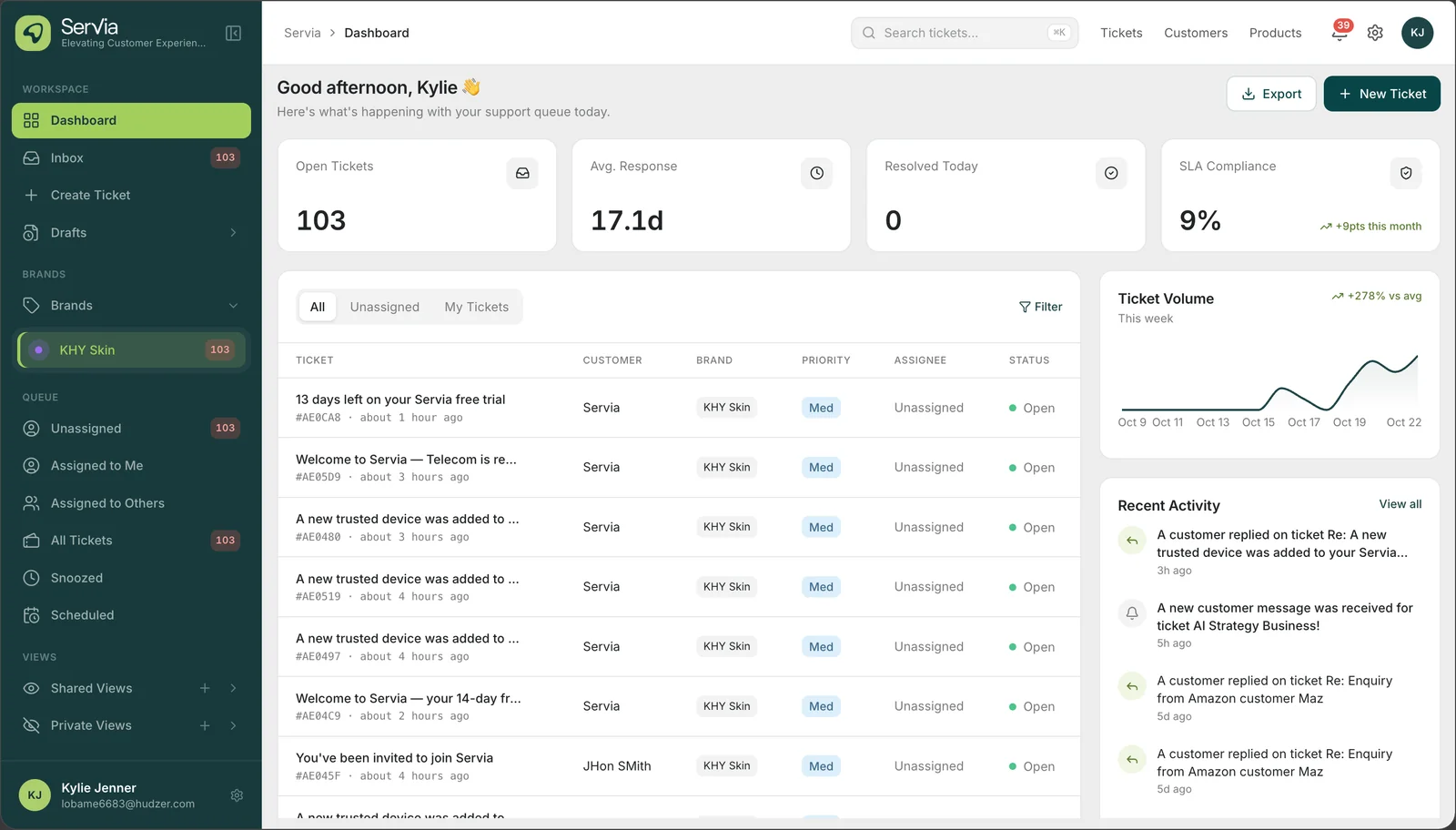
  1. Servia helpdesk dashboard: open tickets, response time, SLA compliance and ticket volume
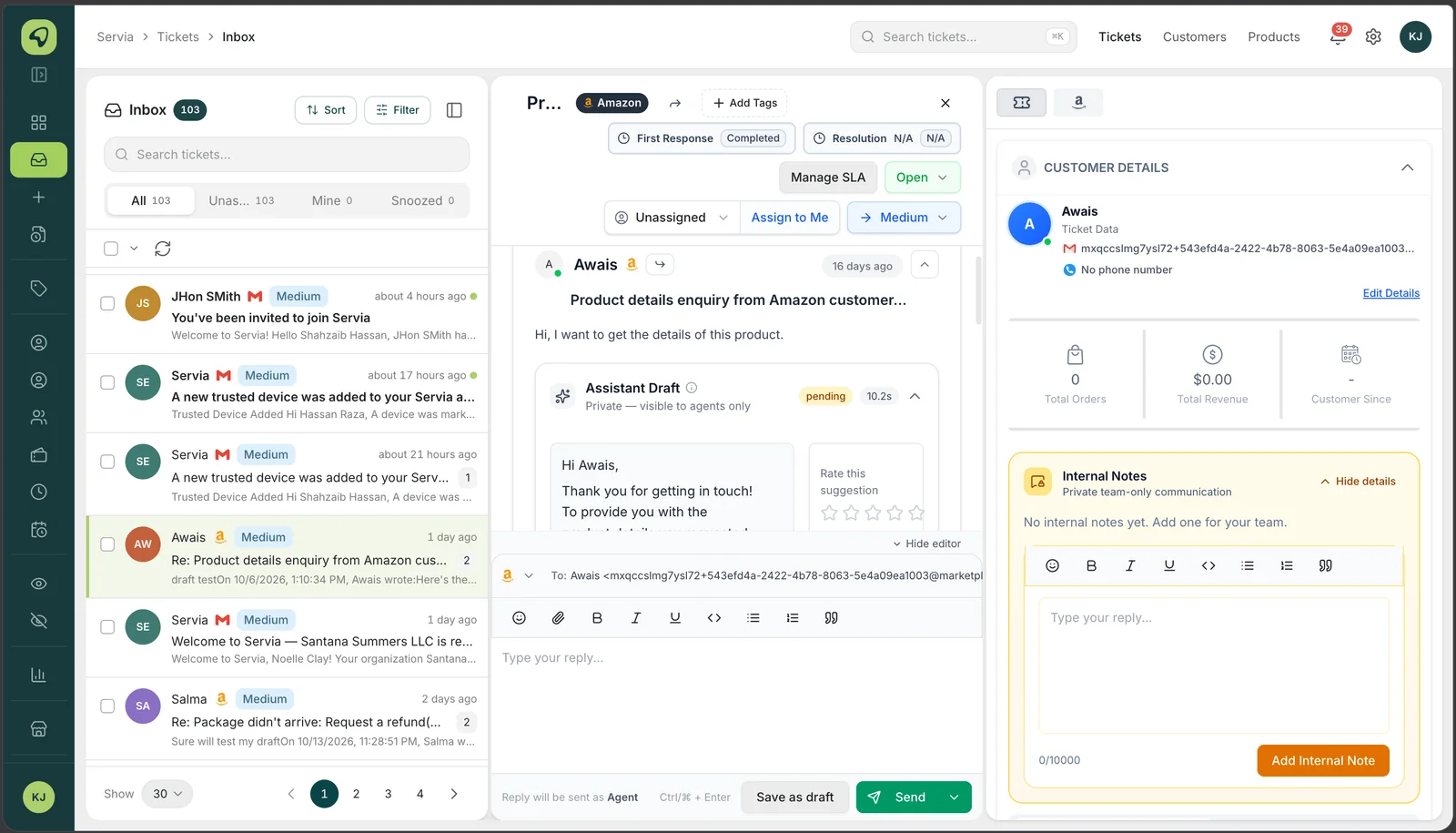
    Servia inbox: an Amazon order ticket with an AI-drafted reply awaiting agent review
    01

    ISS · Now

    Servia

    An AI-powered omnichannel helpdesk that turns every customer conversation into one ticket.

    • SaaS
    • AI
    • Helpdesk
    View case study
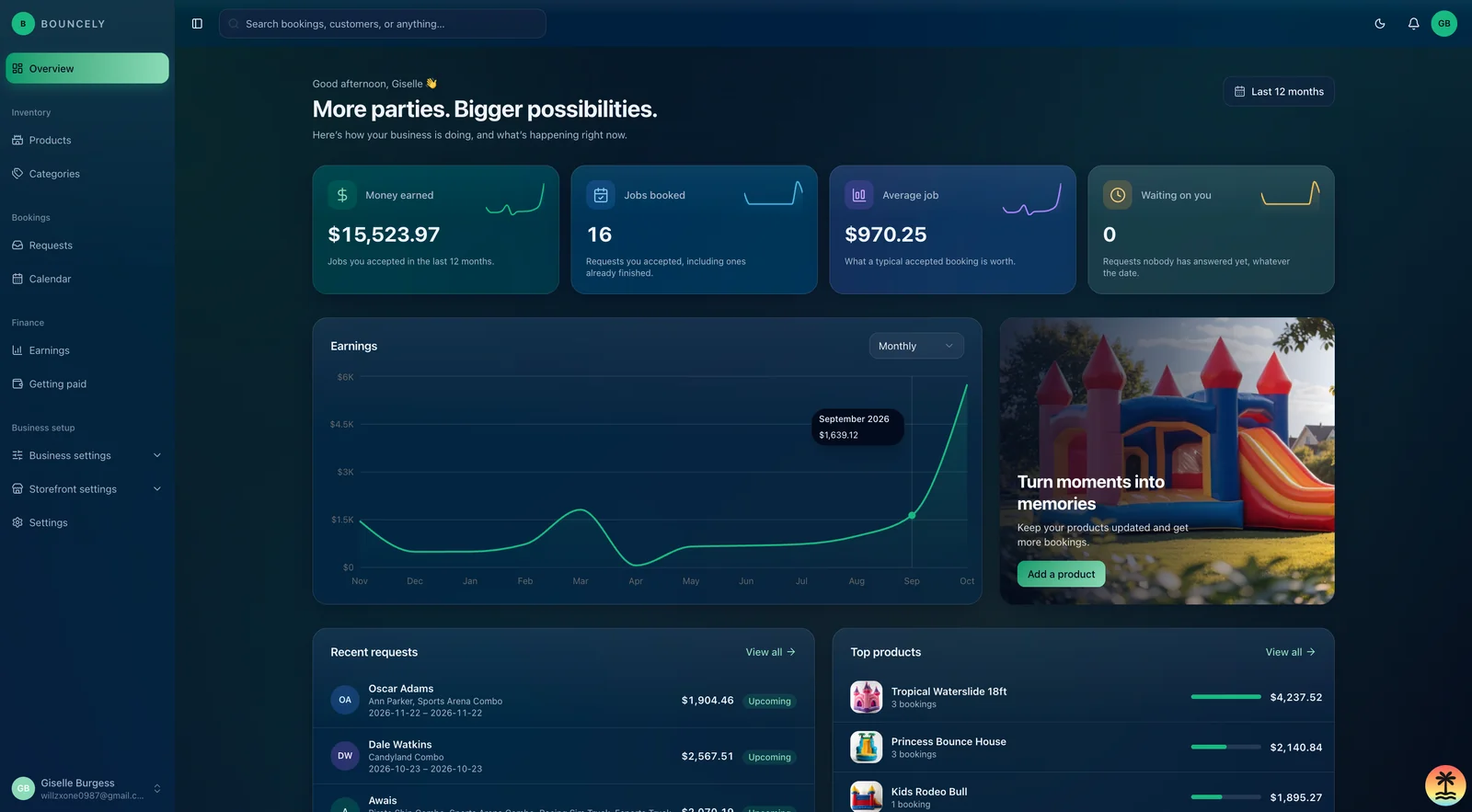
  2. Bouncely vendor portal: overview dashboard with earnings, requests and top products
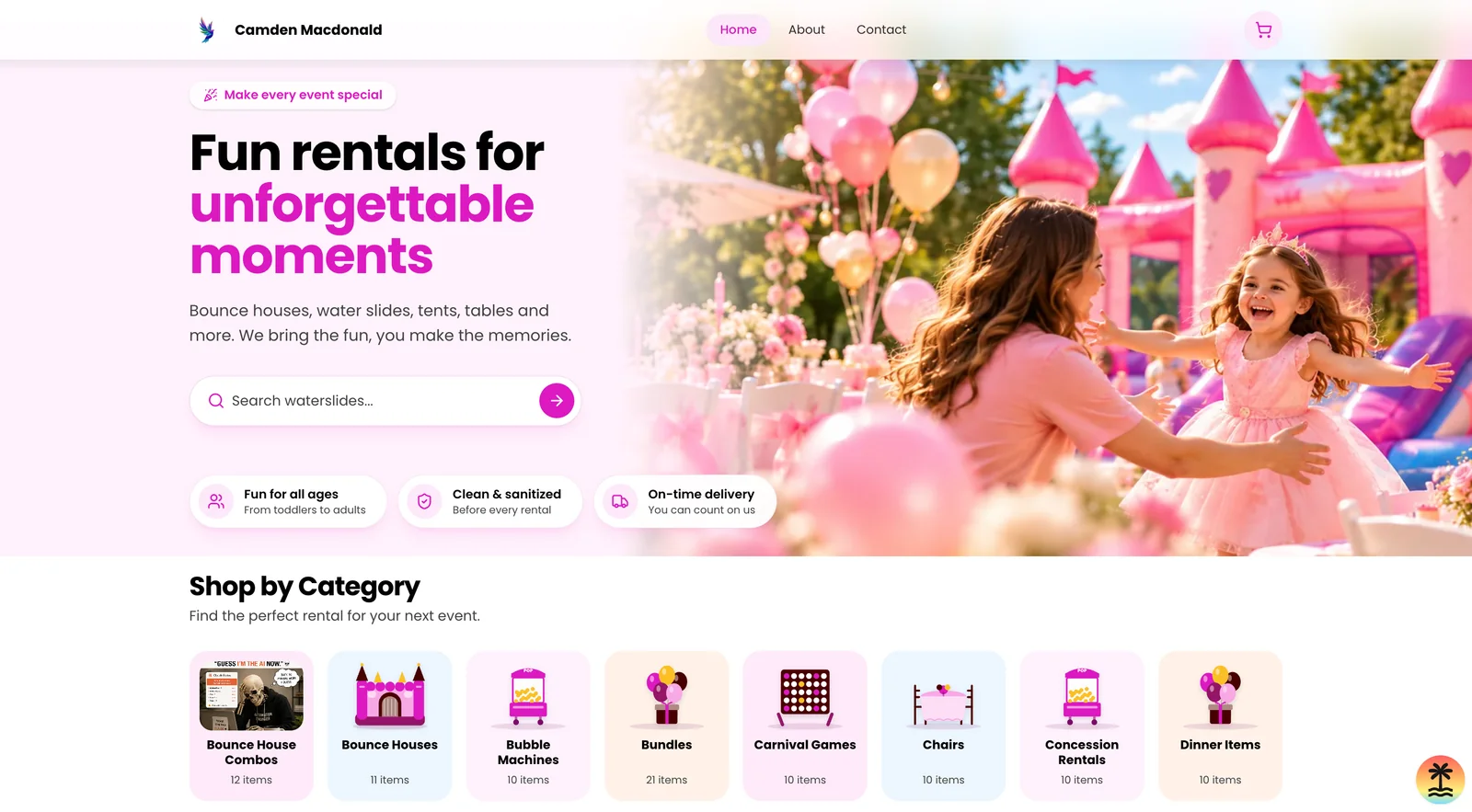
    A vendor's Bouncely storefront: homepage with search and rental categories
    02

    Personal product · Building

    Bouncely

    A multi-tenant SaaS that gives every party-rental business its own storefront, booking flow and payouts.

    • Multi-tenant SaaS
    • AWS
    • Payments
    • In development
    View case study
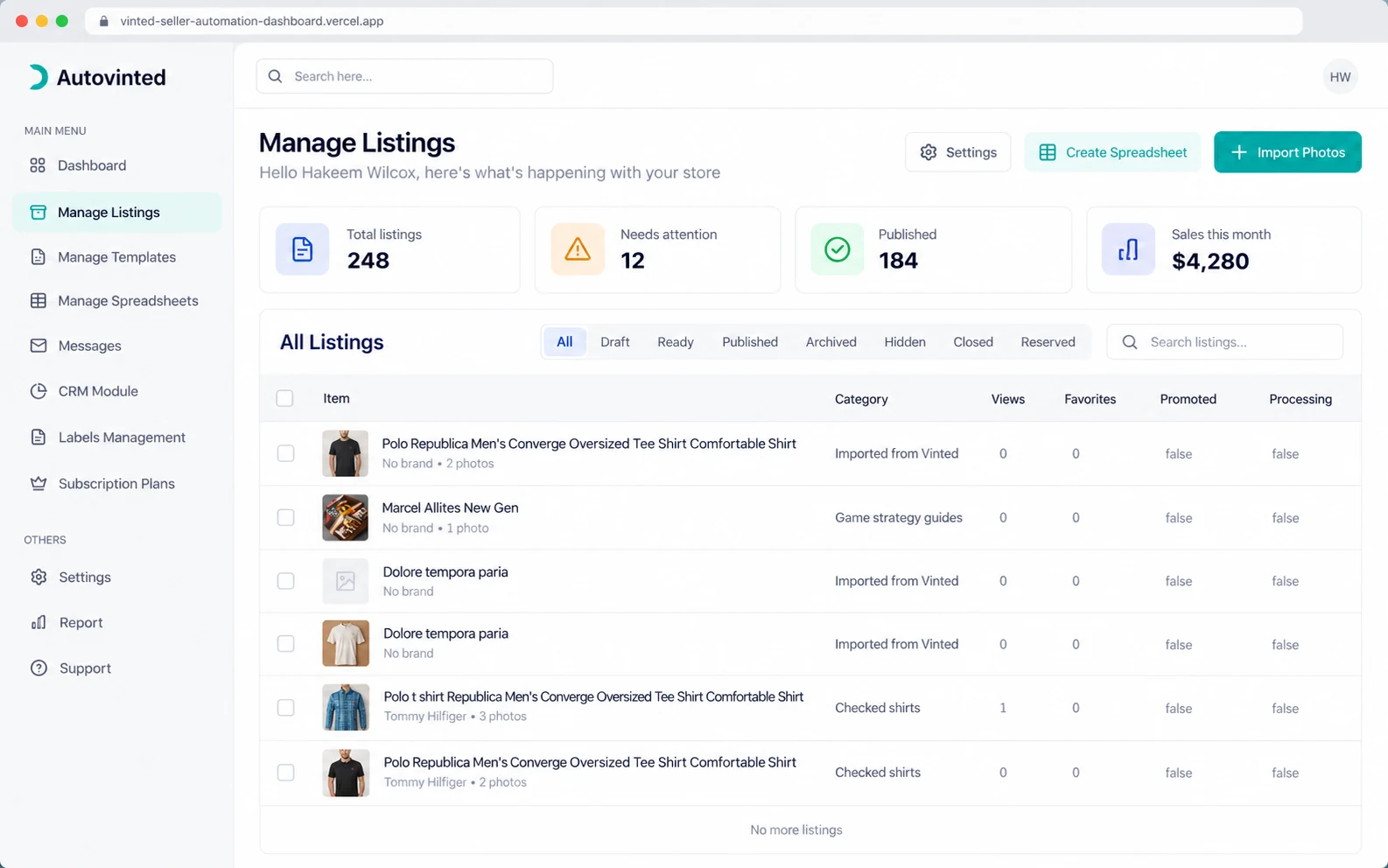
  3. Autovinted dashboard: manage listings with totals, statuses and imported Vinted items
    03 Video demo

    Client project · 2026

    Vinted Seller Automation

    A dashboard plus Chrome extension that publishes listings to Vinted across 24 countries.

    • Automation
    • Chrome Extension
    • Dashboard
    View case study
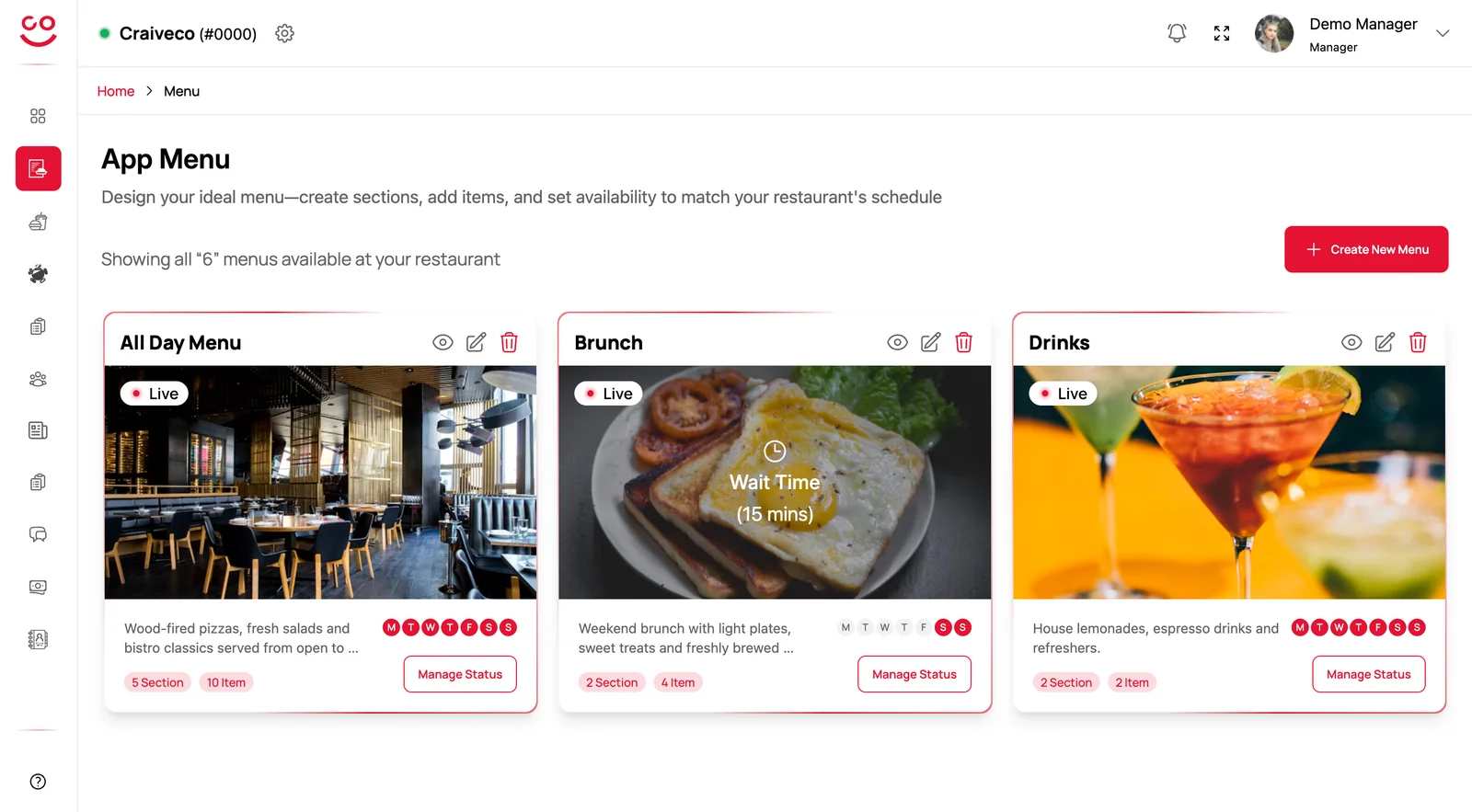
  4. Craiveco restaurant app: app menu builder with breakfast, brunch and drinks menus
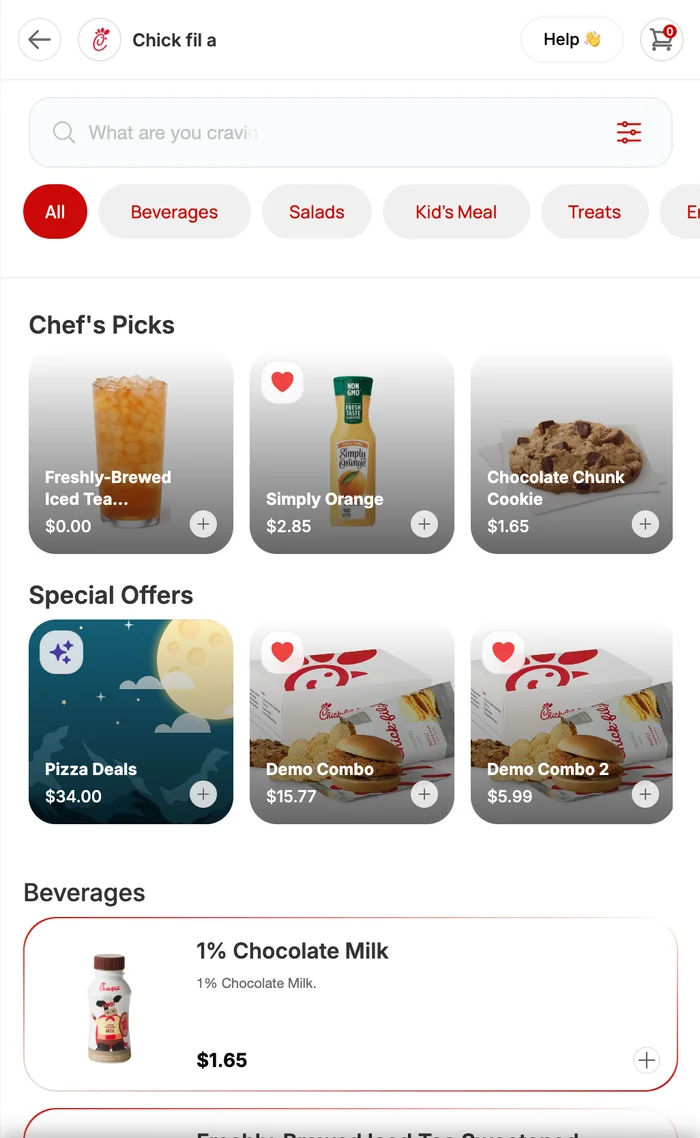
    Craiveco customer app: digital menu with chef's picks and categories
    04

    Craiveco (USA) · 2025

    Craiveco

    Customer, staff and owner apps that keep a restaurant in sync in real time.

    • SaaS
    • Real-time
    • Restaurants
    View case study
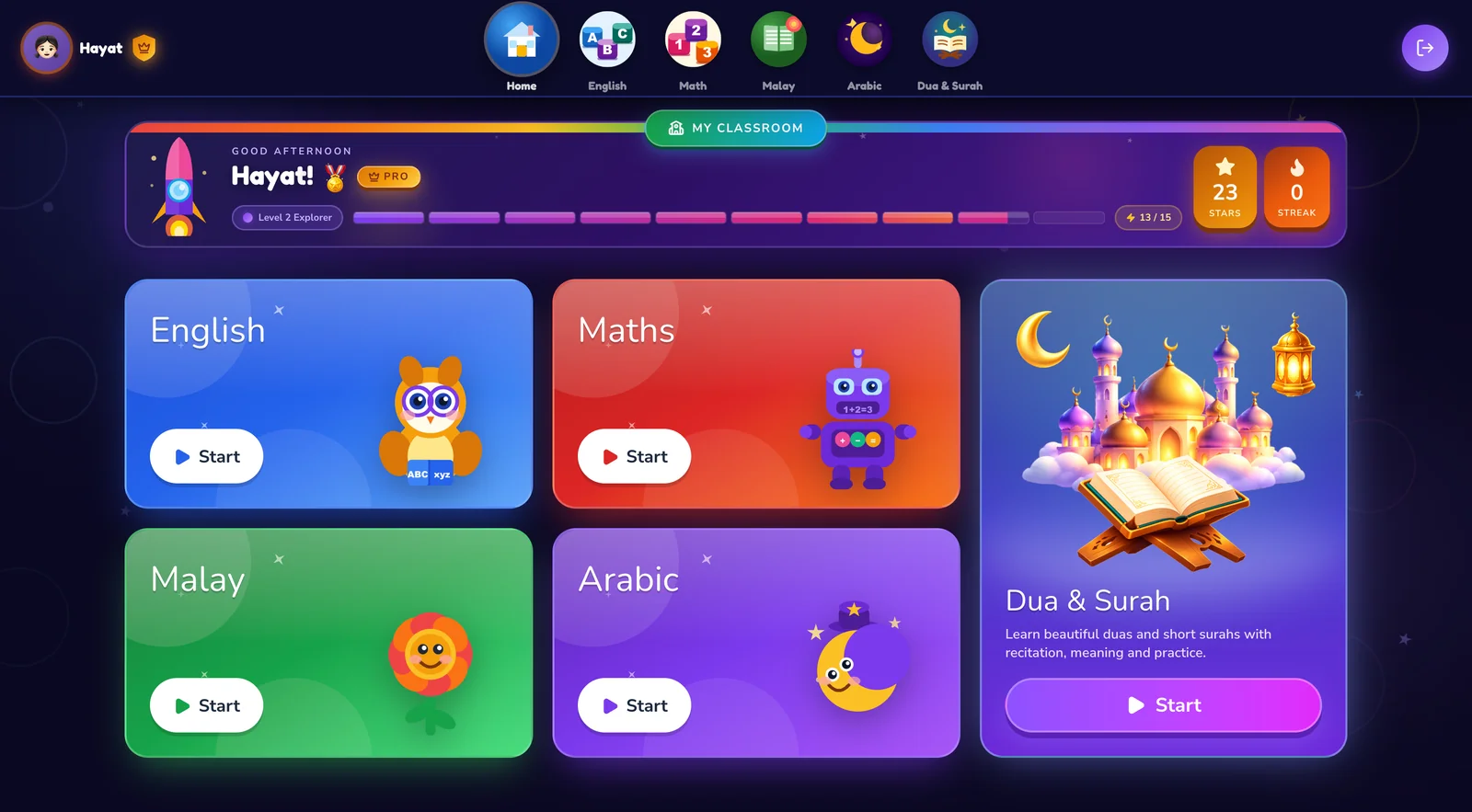
  5. Ilmi Pro home: English, Maths, Malay, Arabic and Dua & Surah subjects with stars and streak
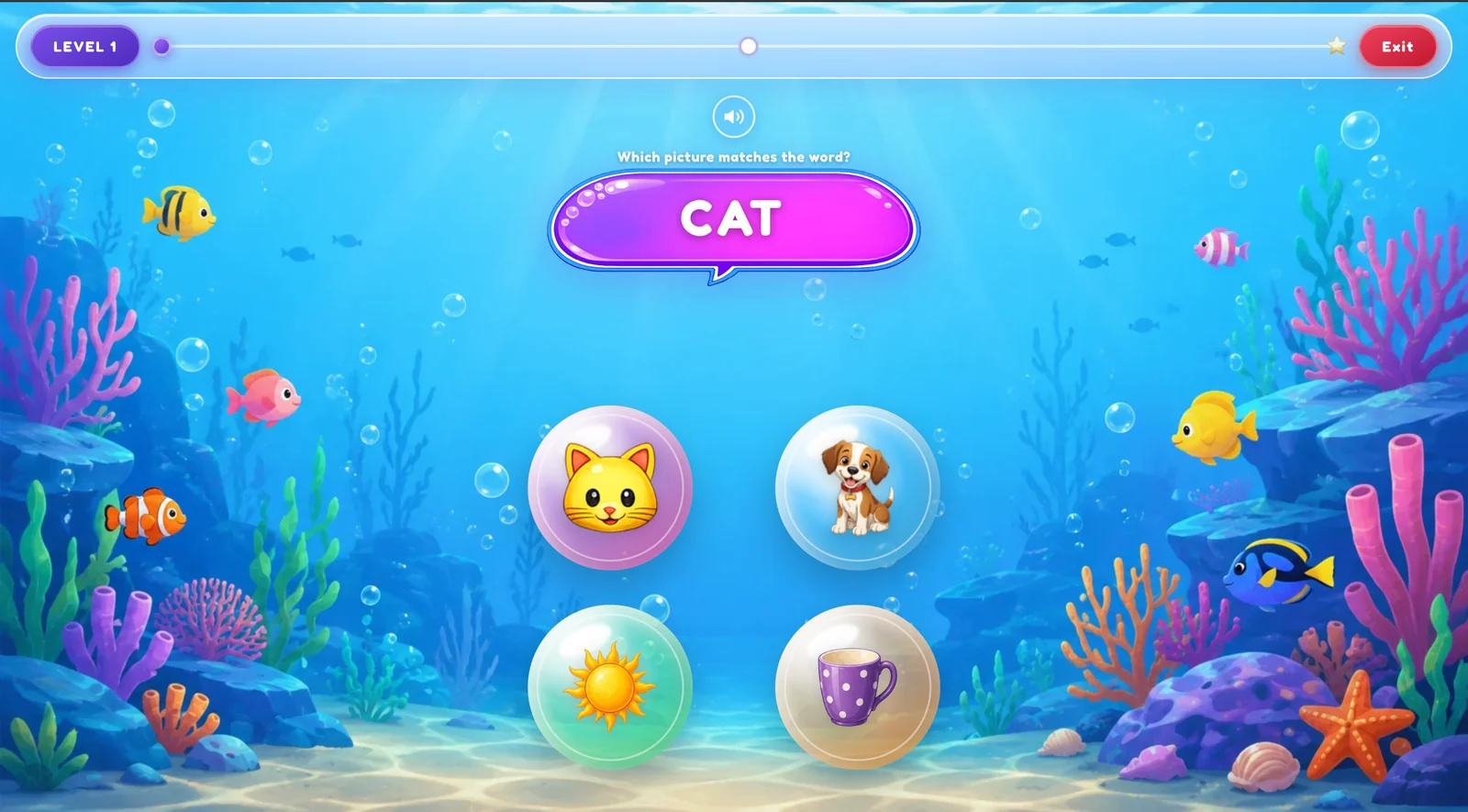
    Ilmi Pro underwater picture-matching game: which picture matches the word CAT?
    05

    Client project · 2026

    Ilmi Pro

    Play-based learning for ages 4–6, with a dashboard that shows parents real progress.

    • Ed-tech
    • Games
    • Platform
    View case study
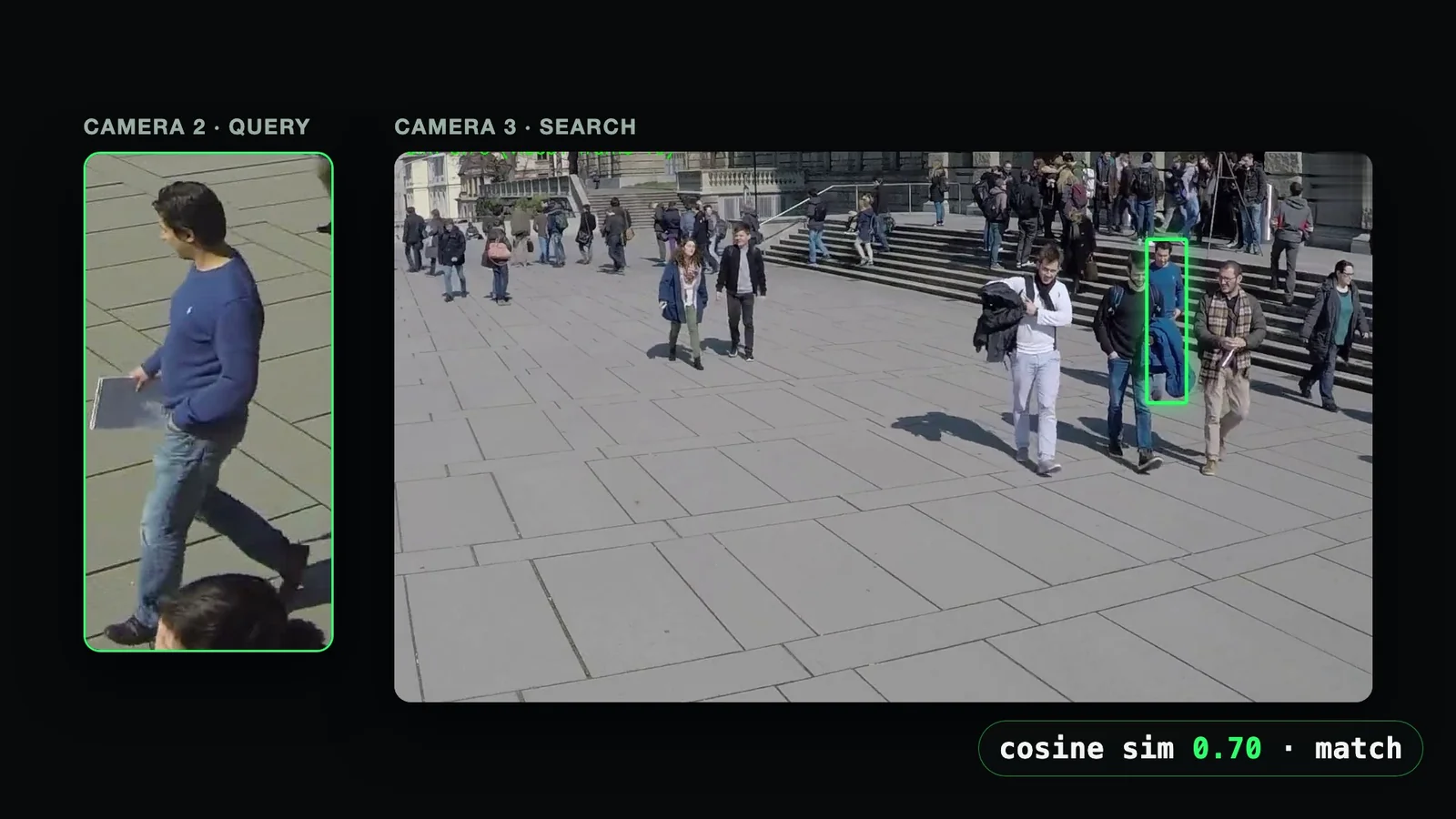
  6. EYE-On re-identification: a person picked on camera 2 found in a crowd on camera 3
    06 Video demo

    FAST NUCES · 2025

    EYE-On

    Real-time person tracking across multiple cameras, even in crowds.

    • Computer Vision
    • AI
    • Open source
    View case study

Automation · 25 systems in production

The automations that run the business

CRM, Slack and API workflows built for a multi-client ad agency. Each one replaces a manual job with a trigger and a chain of steps. Client names are kept private.

  • 04

    Sales pipeline

    From booked call to signed client, with no manual CRM updates.

  • 05

    Client lifecycle

    Onboarding, retention, upsell and offboarding that run on one status change.

  • 04

    Team operations

    Accountability, deadlines and quality checks that don't depend on someone remembering.

  • 08

    Ad account monitoring

    Spend, conversion and change alerts that catch problems before the client does.

  • 04

    AI analysis

    LLM pipelines that read data, classify it and suggest the next action.

01 · Client lifecycle · Flagship

Client Onboarding System

The problem

Every new client meant a day of manual setup: channels, folders, invites, checklists, reminders and contracts, with something different missed each time.

  • CRM
  • Slack
  • Google Drive
  • Google Sheets
  • Typeform
  • Call recording
  • AI summary
  1. Trigger: A won lead's CRM status changes to “Current Client”
  2. Step 01: Status flips to Current Client
  3. Step 02: Internal and client Slack channels are created and the right team is invited by role
  4. Step 03: Drive folder, onboarding checklist and promo calendar are generated from templates
  5. Step 04: 15 minutes after the kickoff call, AI turns the recording into an action plan in the team channel
  6. Step 05: Week-two promo calendar nudges and creative-asset collection run on their own
  7. Step 06: Accounting gets an alert to draft the contract
  8. Result: Seven chained automations started by one status change. A new client is fully set up within minutes, the same way every time.

02 · Sales pipeline

Discovery Call Concierge

The problem

Each lead source used its own Calendly link, so bookings were scattered and every one had to be re-entered in the CRM by hand.

  • Calendly
  • Slack
  • CRM
  • AI classification
  1. Trigger: A prospect books a discovery call from any lead source
  2. Step 01: Booking lands from any of the per-source Calendly links
  3. Step 02: A lead is created automatically in the CRM, tagged with its source
  4. Step 03: An AI step reads the prospect's website and classifies the niche
  5. Step 04: A Slack alert posts with buttons for every next action
  6. Step 05: One click handles cancel, fake-lead or partner-referral outcomes, updating the CRM and emailing the prospect
  7. Result: Zero manual lead entry, and every booking is classified and routed the moment it arrives.

03 · Sales pipeline

Audit Department Pipeline

The problem

Audits were handed between closers and auditors by message, and deadlines were tracked in people's heads.

  • CRM
  • Slack
  • Google Docs
  1. Trigger: A prospect agrees to a free account audit on the discovery call
  2. Step 01: Lead status set to “Audit Needed” posts the full lead file to the audit channel
  3. Step 02: An auditor claims it and status becomes “Auditor Assigned”
  4. Step 03: A watchdog checks every lead for missed deadlines
  5. Step 04: The finished audit doc moves the lead to “Audit Completed” and alerts the closer
  6. Step 05: Closer marks it presented and the lead moves on to close
  7. Result: A 5-stage handoff chain where everyone knows who owns the audit and when it's due.

04 · Ad account monitoring

Live Performance Monitoring & Crisis Escalation

The problem

Leadership had no live view of account performance and found out about problems after clients did.

  • Google Ads API
  • Python
  • BigQuery
  • Slack
  • CRM
  1. Trigger: Daily performance pull plus client “unsatisfied” flags
  2. Step 01: A daily pipeline writes every account's KPIs to BigQuery
  3. Step 02: Threshold breaches post to the client's team channel
  4. Step 03: A client marked unsatisfied triggers an emergency call within 2 business days
  5. Step 04: The call outcome feeds back into the CRM
  6. Result: Problems surface internally and get escalated before the client has to raise them.

05 · Ad account monitoring

Account & Campaign KPI Alerting Suite

The problem

Spend spikes, spend drops and conversion crashes hid inside large accounts until real budget was lost.

  • Google Ads API
  • Slack
  1. Trigger: Daily, compared with a trimmed 7-day average
  2. Step 01: Yesterday's spend and conversions are compared with a trimmed 7-day average
  3. Step 02: Campaign-level and account-level anomalies are both detected
  4. Step 03: The alert names the account, the metric and the size of the swing
  5. Step 04: The owner must comment with a reason, or the alert escalates
  6. Result: Anomalies are caught the next morning with a named owner accountable for each one.

06 · AI analysis

AI Branded / Non-Branded Leakage Detection

The problem

Branded searches leaking into prospecting campaigns inflate their results and hide what's really working.

  • Google Ads API
  • LLM
  • Google Sheets
  • Slack
  1. Trigger: On demand from a Slack command
  2. Step 01: Search terms are pulled per campaign
  3. Step 02: AI separates branded from non-branded terms, including misspellings
  4. Step 03: Leakage and missing negatives are flagged
  5. Step 04: A Google Sheet with tabs and a Slack summary is returned
  6. Result: Clean campaign separation and honest reporting, produced in minutes from a single command.

07 · AI analysis

AI Search Term Awareness Classifier

The problem

Thousands of search terms were reviewed by hand, which was slow, inconsistent and often skipped.

  • Google Ads API
  • LLM
  • Google Docs
  • Slack
  1. Trigger: On demand from a Slack command
  2. Step 01: Every search term is classified into an awareness stage
  3. Step 02: A tiered analysis finds wasted spend and missed opportunities
  4. Step 03: Budget and keyword recommendations are generated
  5. Step 04: A prioritized action list lands in a doc and in Slack
  6. Result: A full search-term audit with clear next actions, replacing hours of manual review.

Every automation

Open any one to watch it run, step by step.

Sales pipeline

  • Discovery Call Concierge

    Each lead source used its own Calendly link, so bookings were scattered and every one had to be re-entered in the CRM by hand.

    1. Trigger: A prospect books a discovery call from any lead source
    2. Step 01: Booking lands from any of the per-source Calendly links
    3. Step 02: A lead is created automatically in the CRM, tagged with its source
    4. Step 03: An AI step reads the prospect's website and classifies the niche
    5. Step 04: A Slack alert posts with buttons for every next action
    6. Step 05: One click handles cancel, fake-lead or partner-referral outcomes, updating the CRM and emailing the prospect
    7. Result: Zero manual lead entry, and every booking is classified and routed the moment it arrives.
  • Missed Call Recovery

    No-shows were handled manually: write an email, find the right booking link, update the CRM. Some were simply never followed up.

    1. Trigger: A rep clicks “Missed Call” on a discovery or follow-up call alert
    2. Step 01: Rep clicks the Missed Call button in Slack
    3. Step 02: The prospect gets a templated email with the correct rebooking link
    4. Step 03: The CRM stage updates to a recovery status
    5. Step 04: A rebooking moves the lead back into the pipeline automatically
    6. Result: No no-show slips through, and recovery takes one click instead of several minutes.
  • Audit Department Pipeline

    Audits were handed between closers and auditors by message, and deadlines were tracked in people's heads.

    1. Trigger: A prospect agrees to a free account audit on the discovery call
    2. Step 01: Lead status set to “Audit Needed” posts the full lead file to the audit channel
    3. Step 02: An auditor claims it and status becomes “Auditor Assigned”
    4. Step 03: A watchdog checks every lead for missed deadlines
    5. Step 04: The finished audit doc moves the lead to “Audit Completed” and alerts the closer
    6. Step 05: Closer marks it presented and the lead moves on to close
    7. Result: A 5-stage handoff chain where everyone knows who owns the audit and when it's due.
  • Access Request Handoff

    Asking a stranger for ad account access looks like phishing when it comes from an address they've never seen.

    1. Trigger: A rep clicks “Access Call” on a lead in the audit stage
    2. Step 01: Rep clicks Access Call
    3. Step 02: The access request email goes out from the same person who ran the discovery call
    4. Step 03: It covers ad account, merchant center and store access, with an NDA offer
    5. Step 04: The audit team is CC'd so they're ready the moment access lands
    6. Result: Access requests come from a familiar person, so trust holds and audits start sooner.

Client lifecycle

  • Client Onboarding System

    Every new client meant a day of manual setup: channels, folders, invites, checklists, reminders and contracts, with something different missed each time.

    1. Trigger: A won lead's CRM status changes to “Current Client”
    2. Step 01: Status flips to Current Client
    3. Step 02: Internal and client Slack channels are created and the right team is invited by role
    4. Step 03: Drive folder, onboarding checklist and promo calendar are generated from templates
    5. Step 04: 15 minutes after the kickoff call, AI turns the recording into an action plan in the team channel
    6. Step 05: Week-two promo calendar nudges and creative-asset collection run on their own
    7. Step 06: Accounting gets an alert to draft the contract
    8. Result: Seven chained automations started by one status change. A new client is fully set up within minutes, the same way every time.
  • Client Feedback & Retention Loop

    Feedback was collected rarely and inconsistently, so unhappy clients were noticed only when they churned.

    1. Trigger: A client reaches 3 months, 6 months or 1 year since onboarding
    2. Step 01: A daily scan finds clients hitting a milestone
    3. Step 02: A personal check-in survey goes out from the owner's profile
    4. Step 03: Responses post to the team channel, tagging the account owners
    5. Step 04: Low scores get flagged for follow-up
    6. Result: Satisfaction is checked at fixed points in every client's lifecycle without anyone tracking dates.
  • Service Upsell Onboarding

    Adding a service to an existing client meant redoing parts of onboarding by hand, and new team members joined without context.

    1. Trigger: An existing client adds a new service
    2. Step 01: A new service is recorded on the client
    3. Step 02: The new specialist is added to the existing client channels
    4. Step 03: Service-specific checklist and assets are generated
    5. Step 04: Accounting is alerted to update the agreement
    6. Result: Expansion revenue gets the same clean setup as a brand-new client.
  • Client Offboarding Flow

    When a client left, channels, access and records were cleaned up piecemeal and often left half-done.

    1. Trigger: Client status changes to “Offboarded”
    2. Step 01: Status changes to Offboarded
    3. Step 02: Each team member gets their wind-down tasks
    4. Step 03: Channels and files are archived
    5. Step 04: The client is removed from every active monitoring run
    6. Result: Clean, complete exits, the mirror image of onboarding.
  • Passive Newsletter Audience Builder

    Contacts from everyday business activity never reached the newsletter.

    1. Trigger: Any booking, purchase or signup
    2. Step 01: Contacts are captured from bookings, payments and forms
    3. Step 02: Each one is segmented by source
    4. Step 03: They're added to the right newsletter list automatically
    5. Result: The newsletter audience grows passively from work the business was already doing.

Team operations

  • Per-Client To-Do & Accountability System

    Tasks were spread across chats with no owner or deadline, so nothing showed what was overdue.

    1. Trigger: A team member clicks “To Do List” in a client's channel
    2. Step 01: A per-client Slack List is created
    3. Step 02: Tasks get an owner and a due date
    4. Step 03: Reminders fire before the deadline
    5. Step 04: Overdue tasks escalate to leadership
    6. Result: Every client has one visible task list with clear owners and automatic follow-through.
  • Strategic Roadmap Cadence

    Multi-week strategic roadmaps were easy to forget once day-to-day work took over.

    1. Trigger: Week 8 after onboarding
    2. Step 01: Week 8: a roadmap template is generated for the client
    3. Step 02: Week 9: a readiness check prompts the owner
    4. Step 03: Week 10: the delivered roadmap is verified
    5. Step 04: Anything missing escalates
    6. Result: Strategic deliverables reach every client on schedule instead of when someone remembers.
  • Recurring Internal Quality-Check Audit

    Nobody had a routine for reviewing account health from the inside, and reviewer workload was uneven.

    1. Trigger: Every 4 months per client
    2. Step 01: A scan finds clients due for review
    3. Step 02: The reviewer with the most capacity is assigned
    4. Step 03: The audit doc moves the client to “Audit Completed”
    5. Step 04: Findings are shared with the account owner
    6. Result: Every account gets an independent quality check on a fixed cycle.
  • Case-Study Win Detection

    Strong results went unnoticed, so marketing never had fresh case studies.

    1. Trigger: Scheduled check on rolling ad performance
    2. Step 01: Performance data is pulled for every account
    3. Step 02: A tiered formula scores ROAS and growth
    4. Step 03: Standout wins post an alert with the numbers
    5. Step 04: Marketing gets a ready-made case-study lead
    6. Result: A steady supply of verified client wins for sales and marketing.

Ad account monitoring

  • Live Performance Monitoring & Crisis Escalation

    Leadership had no live view of account performance and found out about problems after clients did.

    1. Trigger: Daily performance pull plus client “unsatisfied” flags
    2. Step 01: A daily pipeline writes every account's KPIs to BigQuery
    3. Step 02: Threshold breaches post to the client's team channel
    4. Step 03: A client marked unsatisfied triggers an emergency call within 2 business days
    5. Step 04: The call outcome feeds back into the CRM
    6. Result: Problems surface internally and get escalated before the client has to raise them.
  • Account & Campaign KPI Alerting Suite

    Spend spikes, spend drops and conversion crashes hid inside large accounts until real budget was lost.

    1. Trigger: Daily, compared with a trimmed 7-day average
    2. Step 01: Yesterday's spend and conversions are compared with a trimmed 7-day average
    3. Step 02: Campaign-level and account-level anomalies are both detected
    4. Step 03: The alert names the account, the metric and the size of the swing
    5. Step 04: The owner must comment with a reason, or the alert escalates
    6. Result: Anomalies are caught the next morning with a named owner accountable for each one.
  • Zero Ad Spend Detection

    A disapproved ad, an expired payment method or a paused campaign could silently stop an account for days.

    1. Trigger: Accounts with zero spend for consecutive days
    2. Step 01: Spend is checked across every active client account
    3. Step 02: Consecutive zero-spend days trigger a high-severity alert
    4. Step 03: The whole team is mentioned, not just the owner
    5. Result: Dead accounts are caught in hours instead of at month-end.
  • External Change Detection

    Clients or third parties changed campaigns directly, and the agency got blamed for the fallout.

    1. Trigger: Daily scan of account change history
    2. Step 01: Change history is filtered against the agency's own users
    3. Step 02: Any outside change is flagged with who, what and when
    4. Step 03: The team aligns with the client before performance drifts
    5. Result: Every change made outside the agency is visible and attributed.
  • Low Account Activity Monitor

    Under-managed accounts weren't visible until results dropped.

    1. Trigger: Weekly change-count check per account
    2. Step 01: Optimization changes are counted per account
    3. Step 02: Accounts below the threshold are flagged
    4. Step 03: The owner explains in-thread or the alert escalates
    5. Result: Neglect gets surfaced before it shows up in results.
  • Primary Conversion Actions Guard

    Several conversion actions marked “primary” quietly confuse smart bidding.

    1. Trigger: Daily conversion-settings check
    2. Step 01: Conversion settings are read for every account
    3. Step 02: Accounts with conflicting primary actions are flagged
    4. Step 03: The alert explains why it matters for bidding
    5. Result: A subtle configuration error that hurts performance is caught automatically.
  • Brand Impression Share Monitor

    Competitors bidding on a client's brand name steal cheap, high-intent clicks.

    1. Trigger: Daily brand-campaign check
    2. Step 01: Brand campaign impression share is tracked
    3. Step 02: Drops beyond the threshold trigger an alert
    4. Step 03: The team investigates competitor bidding
    5. Result: Brand traffic is defended before competitors take a meaningful share.
  • Platform Outage & Changelog Monitor

    The team lost time debugging problems that were actually platform outages, and missed new platform features.

    1. Trigger: Continuous monitoring of ad platform status and changelogs
    2. Step 01: Status pages and changelogs are polled
    3. Step 02: New incidents or updates post to a dedicated channel
    4. Step 03: The team knows immediately whether an issue is theirs or the platform's
    5. Result: Instant awareness of platform-side incidents and new features.

AI analysis

  • AI Branded / Non-Branded Leakage Detection

    Branded searches leaking into prospecting campaigns inflate their results and hide what's really working.

    1. Trigger: On demand from a Slack command
    2. Step 01: Search terms are pulled per campaign
    3. Step 02: AI separates branded from non-branded terms, including misspellings
    4. Step 03: Leakage and missing negatives are flagged
    5. Step 04: A Google Sheet with tabs and a Slack summary is returned
    6. Result: Clean campaign separation and honest reporting, produced in minutes from a single command.
  • AI Search Term Awareness Classifier

    Thousands of search terms were reviewed by hand, which was slow, inconsistent and often skipped.

    1. Trigger: On demand from a Slack command
    2. Step 01: Every search term is classified into an awareness stage
    3. Step 02: A tiered analysis finds wasted spend and missed opportunities
    4. Step 03: Budget and keyword recommendations are generated
    5. Step 04: A prioritized action list lands in a doc and in Slack
    6. Result: A full search-term audit with clear next actions, replacing hours of manual review.
  • YouTube Ad Research Tool

    Finding which YouTube ads competitors run in a niche took hours of manual searching.

    1. Trigger: A “/vidtao” command in Slack
    2. Step 01: A keyword or niche is entered in Slack
    3. Step 02: Top YouTube ads are pulled with spend, views and dates
    4. Step 03: Results are ranked into a spreadsheet
    5. Step 04: A summary posts back to Slack
    6. Result: Competitive creative research becomes a one-command lookup.
  • Meta Ads Library Creative Puller

    Saving competitor creatives from the Meta Ads Library one by one was slow.

    1. Trigger: On demand from Slack
    2. Step 01: A brand or page is requested from Slack
    3. Step 02: All active ads are pulled from the Ads Library
    4. Step 03: Creatives are saved to a Drive folder
    5. Step 04: A link posts back to the channel
    6. Result: A complete competitor creative library in seconds.

Experience

Where I've shipped

  1. Dec 2025 – Present

    Full Stack & AI Automation Engineer · ISS

    Remote · Building Servia

    • AI agent-assist pipeline that drafts replies from conversation context and knowledge sources, gated by a 1–5 star human review workflow with brand voice and safety guardrails.
    • Building a helpdesk that unifies 8+ channels (Gmail, Outlook, WhatsApp, Facebook, Instagram, Amazon, eBay, Etsy) into one ticket workspace with threading and duplicate detection.
    • Gmail integration with OAuth 2.0, secure token storage, mailbox sync, thread-metadata matching and per-brand account routing.
    • SLA engine with priority-based response and resolution targets, live countdowns, breach alerts and escalations.
    • RBAC with predefined and custom roles, per-user overrides, route-level enforcement, audit logs and a multi-organization admin portal.
  2. Mar 2024 – Oct 2025

    AI Automation Engineer · INNOVIZZLE

    Faisalabad, Pakistan (Remote)

    • Led automation initiatives for enterprise clients, reducing manual operations by 45%.
    • Integrated CRM/ERP systems (Salesforce, SAP, HubSpot) with Google Drive and AWS S3 through REST APIs and webhooks.
    • Built low-code automation with n8n, Zapier and Make.com across 15+ SaaS tools.
    • Automated lead-generation pipelines with GoHighLevel and Apollo, improving conversion rates by 25%.
  3. Mar 2024 – Dec 2025

    Full Stack Developer · VISRIC

    Islamabad, Pakistan

    • Led development of two production platforms, Craiveco and Ultra Healers, owning frontend and backend delivery.
    • Designed and optimized REST APIs with Node.js and Express; built interfaces with React, Tailwind CSS and Redux.
    • Improved application performance by 30% and cut state-related bugs by 25% with Redux Thunk, RTK Query and Redux Persist.
    • Implemented Firebase and JWT authentication with role-based access for 1,000+ active users.
    • Shipped with Docker and CI/CD pipelines.
  4. Dec 2023 – Feb 2024

    Frontend Developer Intern · VISRIC

    Islamabad, Pakistan

    • Promoted to full-time Full Stack Developer.
    • Converted 15+ Figma designs into production components with React, Tailwind CSS and Chakra UI.
  5. Sep 2023 – Aug 2025

    AIESEC · Volunteer

    Sri Lanka, Thailand, Pakistan (Remote)

    • Software Engineer, AIESEC Sri Lanka Sep 2023 – Aug 2024

      Built a project management tool used by 100+ volunteers across 5 countries with React and Node.js; 15% faster load times, 25+ issues resolved.

    • EST OGV, AIESEC Thailand Aug 2024 – Feb 2025

      Built dashboards monitoring exchange processes across 5+ Local Committees, improving follow-up efficiency by 20%.

    • Director, Entity Control Board, AIESEC Pakistan Feb 2025 – Aug 2025

      Ran 3+ leadership workshops for 90+ students; generated 50+ leads and secured 10+ exchange applicants.

  6. 2021 – 2025

    BS Computer Science, Major in Generative AI

    FAST NUCES (National University of Computer and Emerging Sciences) · Islamabad, Pakistan

    • Dean's List (top 10%): Fall 2021, Spring 2022, Fall 2024
    • President, FAST Club of App Development & Programming: led 100+ members (2023–2025)
    • Teaching Assistant for Programming Fundamentals, OOP, Data Structures, Algorithms and AI: supported 600+ students (2022–2025)
    • ICPC 2024–25

      Regional-level competitor representing FAST NUCES.

    • FAST Problem-Solving Competition 2025

      Top 3 of 20+ teams; solved 5+ advanced problems in graph theory and dynamic programming.

About

3D illustrated portrait of Waleed Asif in a dark suit, pointing toward the text

Faisalabad, Pakistan

I'm a full-stack developer working in React, Next.js, Node.js, TypeScript and Python, with 3 years of professional experience shipping production SaaS platforms, marketplaces, ed-tech products and AI-powered features.

Right now I'm building Servia, an AI-powered omnichannel helpdesk that pulls email, social and marketplace conversations into one ticket workspace, with AI-drafted replies gated by human review. Before that I led platform delivery at VISRIC and engineered browser-automation systems on Chrome Manifest V3.

The other half of my work is automation: CRM, Slack and API workflows that replace manual operations end to end, from lead intake and onboarding to live account monitoring. I studied Computer Science with a major in Generative AI at FAST NUCES and competed at ICPC regionals.

What I do

  1. 01Full-stack product engineeringNext.js and React frontends, Node.js and Python APIs, auth, RBAC, real-time features and payments, shipped to production.
  2. 02AI product featuresLLM reply pipelines with human review gates, guardrails, embeddings, and AI onboarding that reads a company's website.
  3. 03Workflow & CRM automationn8n, Zapier, Make.com and custom code connecting CRMs, Slack, Google Workspace and ad platforms into self-running operations.
  4. 04Browser automationChrome Manifest V3 extensions with shadow-DOM React UIs, typed message passing and anti-bot-aware automation pipelines.
  5. 05Computer visionMulti-camera tracking pipelines built with SAM2, YOLOv8 and Vision Transformers in PyTorch.

Toolkit

Languages
TypeScript · JavaScript (ES6+) · Python · SQL · C++ · C#
Frontend
React · Next.js (App Router) · Redux Toolkit / RTK Query · Zustand · Tailwind CSS · shadcn/ui · Chakra UI · TanStack Table · Framer Motion · Zod · TanStack Start · TanStack Query · TanStack Form
Backend
Node.js · Express · FastAPI · Flask · Django · REST · GraphQL · WebSockets · Server Actions · OAuth 2.0 · JWT · Firebase Auth · RBAC · oRPC
Data
MongoDB · PostgreSQL · Redis · MySQL
AI
OpenAI API · LLM pipelines · Embeddings · AI guardrails · PyTorch · SAM2 · YOLOv8 · ViT
Automation
n8n · Zapier · Make.com · GoHighLevel · Apollo · Chrome Extensions (MV3)
Cloud & DevOps
Docker · CI/CD · AWS (ECS Fargate, EC2, S3, RDS, Route 53, ACM, ALB) · Vercel · Netlify · Heroku · Git · Linux · OpenTofu / Terraform · GitHub Actions · Traefik
Integrations
Stripe · Shopify · Gmail API · Salesforce · SAP · HubSpot · Calendly · Webhooks · Stripe Connect · Stripe Billing

Languages: English (Fluent), Urdu (Native)

FAQ

Quick answers

  1. Who is Waleed Asif?

    I'm Waleed Asif, a full-stack developer and AI automation engineer based in Faisalabad, Pakistan. I build production SaaS platforms in React, Next.js, Node.js, TypeScript and Python, and the CRM, Slack and API automations that run the business behind them. I've worked professionally since December 2023.

  2. What can you build for me?

    Two things, often together. A product: Next.js and React frontends, Node.js and Python APIs, auth, RBAC, payments and real-time features, shipped to production. And the operations around it: n8n, Zapier, Make.com and custom-code workflows that connect your CRM, Slack, Google Workspace and ad platforms so lead intake, onboarding and account monitoring run without manual work.

  3. Who do you usually work with?

    SaaS teams and founders who need a product built end to end, and agencies or service businesses that want manual operations turned into workflows. Past clients include a US restaurant-tech company, a UK home-care provider, and US SaaS and marketplace startups. The 25 automation workflows on this site were built for client businesses, with their names anonymised.

  4. Can you add AI to an existing product?

    Yes. I build LLM features that are safe to put in front of customers: reply pipelines that draft answers from conversation context and knowledge sources, gated by human review, plus guardrails, embeddings and AI onboarding that reads a company's website. Servia, the helpdesk I'm building now, works this way.

  5. What results have you delivered?

    Workflow automation that cut manual operations by 45% for enterprise clients, 15+ SaaS tools connected into automated workflows, and auth systems serving 1,000+ active users. Each case study on this site lists the role, stack, period and outcome.

  6. Are you available for remote work?

    Yes. I'm open to remote roles in Europe, the UK, Asia and the USA. I work on GMT+5, which overlaps strongly with UK and EU business hours. The fastest way to reach me is email: willzxone0987@gmail.com.